
HeyMilo in Your Ashby Interview Plan
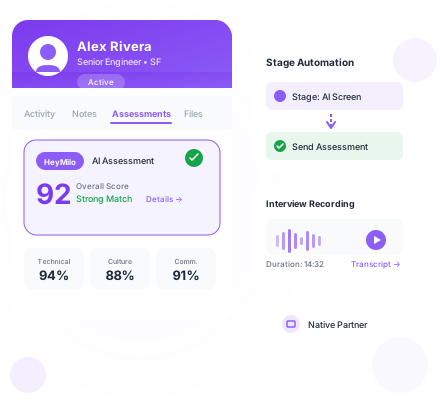
Native Ashby assessment integration. HeyMilo appears in your Admin > Integrations menu. Add it to any interview plan like any other assessment tool. Candidates screen automatically when they hit your configured stage.


Why Ashby + HeyMilo
Built for Structured Hiring
Ashby users choose structured hiring for a reason. HeyMilo fits that philosophy perfectly—consistent evaluation criteria for every candidate, scored responses that enable fair comparison, results that integrate directly into your hiring workflow.
Native assessment partner
HeyMilo shows up in Ashby's integrations menu. No workarounds. No external tools. Add it to interview plans just like any other assessment.
Automate on stage entry
Configure HeyMilo to trigger when candidates enter specific stages. Move a candidate to 'AI Screen' and they receive an invitation automatically.
Results in candidate profiles
Scores, AI summaries, transcripts, and recording links appear directly under the Assessments tab. Your team reviews without context-switching.
Consistent, comparable scoring
Every candidate receives the same evaluation criteria. Scores are generated from the same rubric. Compare candidates fairly at scale.
How It Works
How It Works in Ashby
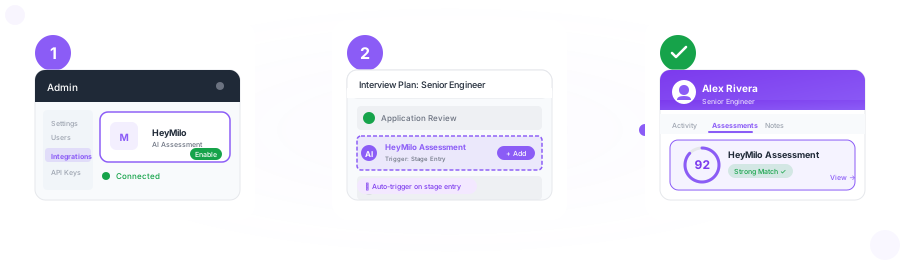
Enable HeyMilo in Ashby
Go to Admin > Integrations in Ashby. Find HeyMilo. Exchange API keys. The connection is established in minutes.
Add to your interview plans
Edit any job's interview plan. Add HeyMilo as an activity. Configure which stage triggers the assessment automatically.
Results appear in profiles
When candidates complete assessments, scores and summaries populate their profiles. Your team reviews and makes decisions without leaving Ashby.
Results in Ashby
What Your Team Sees
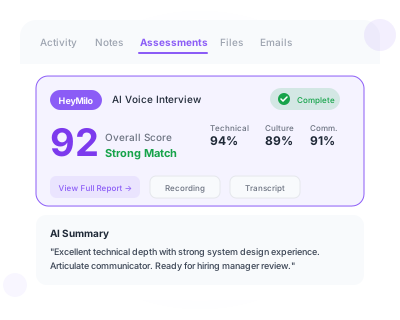
Completed assessments populate the candidate's profile with structured data your team can immediately act on.
- Assessment scores displayed prominently on the profile
- AI-generated summaries for quick context
- Full transcripts for detailed review
- Direct links to audio/video recordings
- Results organized under the Assessments tab
Flexible Screening Options
Run voice interviews, video assessments, SMS conversations, or structured forms—whatever fits the role. Combine multiple screening types in a single workflow.
Explore available agentsFAQ
Common Questions
Everything you need to know about the Ashby integration.
Still have questions?
Talk to UsHeyMilo runs actual two-way conversations with candidates—voice or video interviews where the AI adapts questions based on responses. It's not just a static questionnaire. Candidates feel like they're talking to a real interviewer.
Yes. Edit the HeyMilo activity in your interview plan, go to the Automation tab, and select 'Automate on Stage Entry.' Candidates are screened automatically when they hit that stage.
Assessment scores, AI-generated summaries, full transcripts, and links to recordings appear under the Assessments tab. Everything your team needs to make a decision.
Perfectly. Every candidate receives identical evaluation criteria. Scores are generated from the same rubric. You can compare candidates fairly and consistently across your pipeline.
Yes. Add HeyMilo to any interview plan with whatever configuration that role needs—voice interviews for some, video for others, SMS for frontline roles. Each job gets the screening approach that fits.
Ready to add HeyMilo to your Ashby workflow?
Start screening candidates in minutes. No engineering required.